
You have a website and your product is ready to sell. What's missing is getting paid. I'm not talking about charging to build a website, but about receiving payments for selling your products through your website.
You need to solve three things:
- 1. Charge: your customer can pay you.
- 2. Deliver: they receive what they bought.
- 3. Receive the money: it lands in an account you can use.
You need the simplest mechanism that works for your business, not the most sophisticated integration.
1. Understand what a checkout is and how it relates to the payment
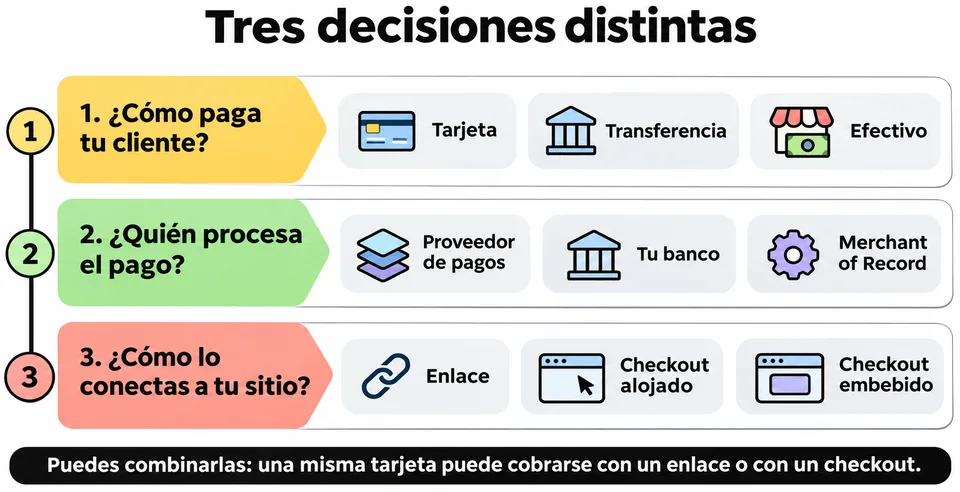
What is a checkout? It's what happens after clicking “Buy”: the screens where your customer reviews their order and total, chooses how to pay and confirms the purchase.
There are two ways to show it:
| Hosted checkout | Embedded checkout | |
|---|---|---|
| Where your customer pays | On a page from the provider | Inside your site |
| Who manages the page | The payment provider | You, with the provider's components |
| Examples | Stripe Checkout, Mercado Pago Checkout Pro | Stripe embedded Checkout, Mercado Pago Checkout Bricks |
Both can connect to your order system to process orders. That's why integrating a checkout doesn't necessarily mean building the payment form from scratch.
The payment method, the provider that processes the payment and the way you integrate it are not the same thing.
For example, you can accept cards through Stripe using a link, a hosted checkout (the provider manages it) or a more customized integration. [1]
2. You don't need a payment gateway to start charging
You can sell from your site without integrating a gateway: a bank transfer and a manual confirmation work for your first sales. Decide based on how you'll charge for and deliver your product.
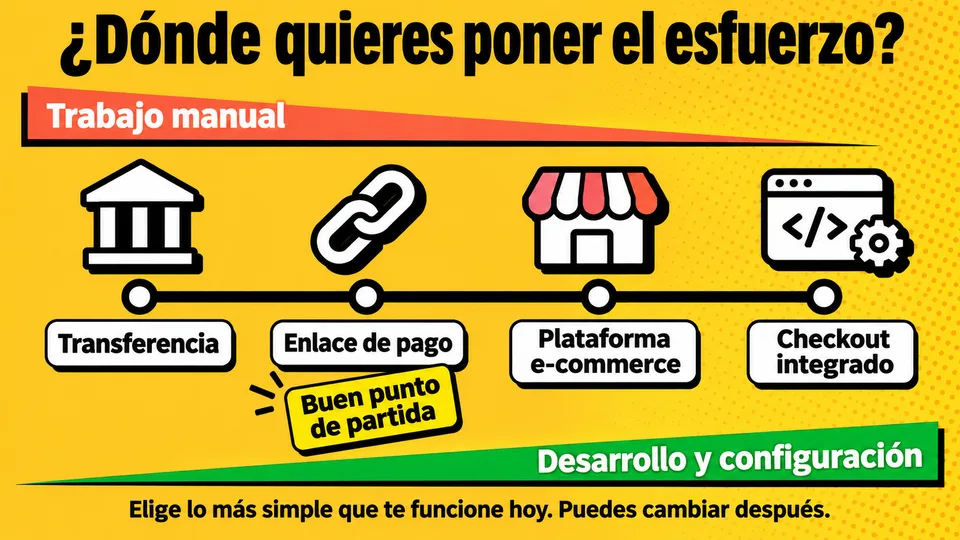
Different ways to get paid from your website:
| Option | How it works | Your work |
|---|---|---|
| Bank transfer | You share your bank details. | Almost no development, but you check every deposit before delivering. |
| Payment link | Your “Buy” button leads to a payment page from the provider. | You set up the product and price. At first you can deliver by hand. |
| Integrated checkout | You connect your site to the provider (hosted or embedded). | To deliver automatically, your system must confirm every payment. |
| E-commerce platform | Shopify or WooCommerce give you a catalog, cart and orders. | You set up the store and connect a provider available in your country. |
There's also cash, deposits, card terminals and cash on delivery, depending on your business.
Showing your product on your website doesn't mean the payment has to happen there.
3. Some providers to start charging
These providers process payments. The countries refer to the business, not the buyer (your customer). Account approval isn't guaranteed; check the terms.
| Provider | LATAM countries | Payment link | Hosted checkout | Payment on your site |
|---|---|---|---|---|
| Stripe [1] | Brazil and Mexico (list) | Payment Links | Checkout | Embedded Checkout |
| Mercado Pago [2] | Argentina, Brazil, Chile, Colombia, Mexico, Peru and Uruguay (offering) | Payment link | Checkout Pro | Checkout Bricks (varies by country) |
| Wompi [3] | Colombia (local offering) | Links | Web Checkout | Widget (payment window) |
Review required documents, fees, payouts, refunds, terms and conditions. Confirm they accept your product.
Official sources checked: November 21, 2026. Countries, features and terms may change; confirm the local offering.
4. If you need a store: Shopify and WooCommerce
If you need to show several products, add a cart and organize orders, you can use an e-commerce platform. The platform helps you with the store; the payment provider handles the charge.
| Shopify [4] | WooCommerce [5] | |
|---|---|---|
| What it is | A platform to build your store | A store you add to a WordPress site |
| Who maintains it | Shopify | You (hosting, updates and maintenance) or someone you hire |
| How you get paid | In Mexico you can apply for Shopify Payments; in other LATAM countries, you connect a supported provider | You connect a provider, such as Mercado Pago if it's available in your country. WooPayments is optional |
| Watch out for | It's not available in Cuba | If nobody maintains the site, the store becomes outdated |
Another option if you sell software: Merchant of Record
A Merchant of Record (MoR) isn't just a store or a payment provider: it acts as the seller to your customer and handles the taxes on the sales its contract covers.
Paddle is an example for software businesses. Before choosing it, check whether it supports your country and what you sell: it isn't an option for every product or service. [6]
It doesn't mean you can forget about everything. You still deliver the product, support your customers and meet your local tax obligations. Check with your accountant how to record that income.
5. Which option fits your business?
Choose your situation to see a recommended path:
Start with a payment link
To sell a consultation, a workshop or a simple product, don't build an integration before you know there are buyers.
- Verify your account with a provider available in your country.
- Set up the product and price, generate the link and put it on “Buy”.
- Test the payment; at first you can confirm the sale and deliver manually.
Consider a bank transfer
For example, SPEI in Mexico. Compare your bank's fees and the time you'll spend checking each payment: less integration doesn't mean zero work.
- Agree on the amount, reference and delivery date.
- Share the bank instructions.
- Confirm the deposit in your account, not with a screenshot, and deliver.
Use a store platform
It helps you organize products, cart and orders without building everything from scratch.
- Compare Shopify and WooCommerce.
- Upload your products and connect a provider available in your country.
- Test purchase, delivery and refund before opening the store.
Connect payment to delivery
The checkout can be hosted or embedded. What matters is that your system confirms the payment and delivers without duplicating orders.
- Match each charge to an order.
- Confirm the payment from your server before granting access; check your provider's documentation, such as this Stripe guide.
- Test pending payments, repeated notifications and refunds.
You don't have to choose a final solution. Start with the simplest one that works for you and explain, before payment, when and how the customer will receive their purchase.
Summary
To start getting paid you don't need to build everything from scratch. A bank transfer or a payment link can handle your first sales; an e-commerce platform helps if you need a catalog and cart. Automate when checking payments and delivering by hand is no longer enough.
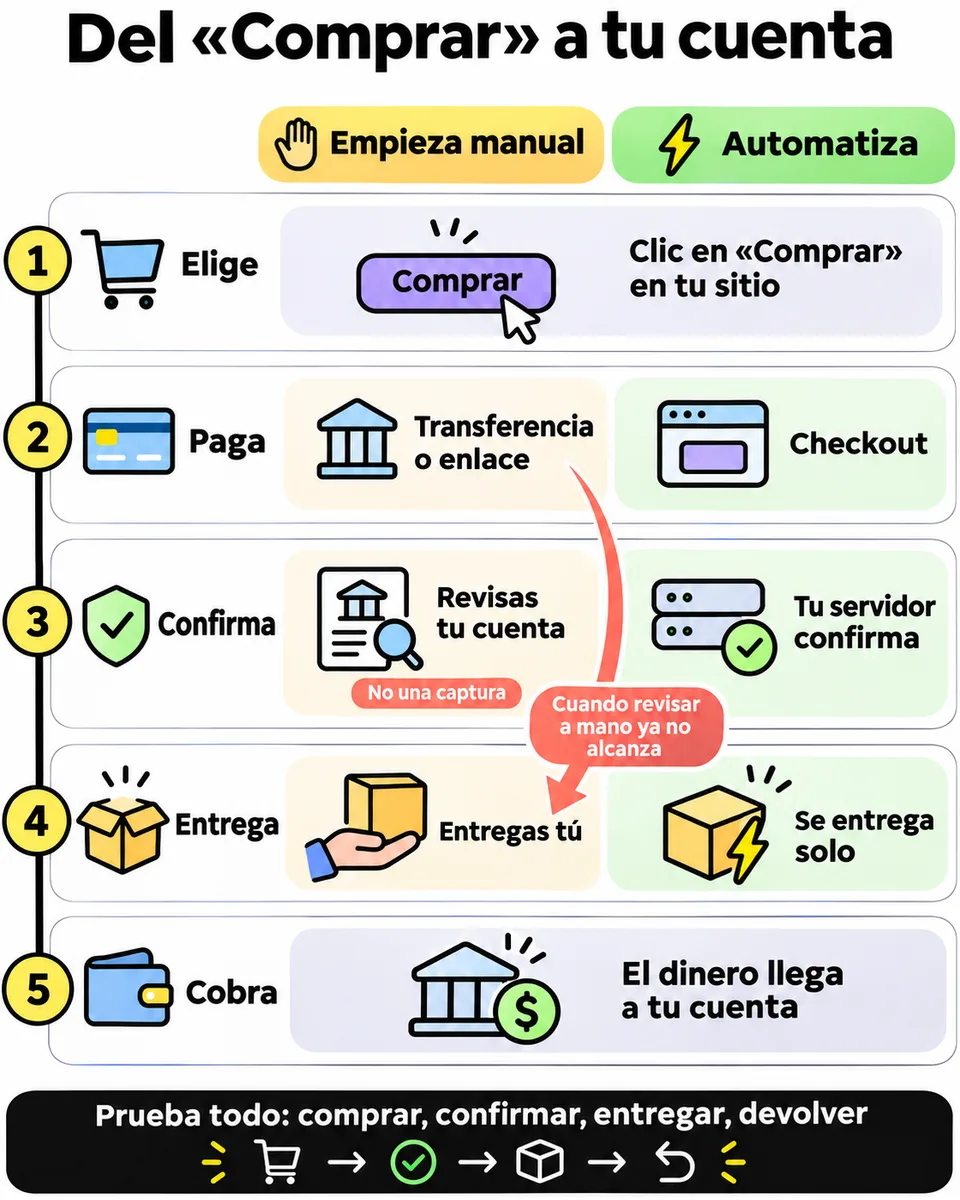
Before choosing, confirm the option works for your business and country, how much it costs you and when you'll receive the money. Test the full journey: buy, confirm the payment, deliver and refund.
First figure out how to sell and deliver well. Then add the integration you actually need.
References
Checked: November 21, 2026. Availability and terms may change; confirm the local offering. Specific links are next to each option. This guide doesn't replace tax or legal advice.